Skip to content

A question that frequently comes up is, "Is there any way I can use that database that (insert name of another UH campus) has that we don't?" The short answer is no. The terms of our subscriptions require libraries to only allow access by that library's users (i.e., a campus's students, staff, and faculty).

You might, in some cases, be able to physically visit another campus's library to use their database. But whether you actually can or not depends on how strict the database's vendor is.

Why are there databases that only some campuses have access to, if we're all part of one university system? Subscription fees are usually based on FTE — a measure of student enrollment at a campus. A database subscription that includes all campuses is therefore quite costly. Unavoidably, there are many specialized databases that are only subscribed to by one or a few libraries.

If there is a particular article that you are trying to find that's not available in one of our databases, please get in touch with us. We might be able to find another library that can send us a copy of the article, provided that we haven't tried to get a lot of articles from that publication before.

If there is a database (or book, video, periodical etc.) that you think we should acquire, please let us know and we will consider it purchasing or subscribing to it.

Related resources:

A question that frequently comes up is, "Is there any way I can use that database that (insert name of another UH campus) has that we don't?" The short answer is no. The terms of our subscriptions require libraries to only allow access by that library's users (i.e., a campus's students, staff, and faculty).

You might, in some cases, be able to physically visit another campus's library to use their database. But whether you actually can or not depends on how strict the database's vendor is.

Why are there databases that only some campuses have access to, if we're all part of one university system? Subscription fees are usually based on FTE — a measure of student enrollment at a campus. A database subscription that includes all campuses is therefore quite costly. Unavoidably, there are many specialized databases that are only subscribed to by one or a few libraries.

If there is a particular article that you are trying to find that's not available in one of our databases, please get in touch with us. We might be able to find another library that can send us a copy of the article, provided that we haven't tried to get a lot of articles from that publication before.

If there is a database (or book, video, periodical etc.) that you think we should acquire, please let us know and we will consider it purchasing or subscribing to it.

Related resources:

We made a couple of changes to online library tools that we wanted you to be aware of.

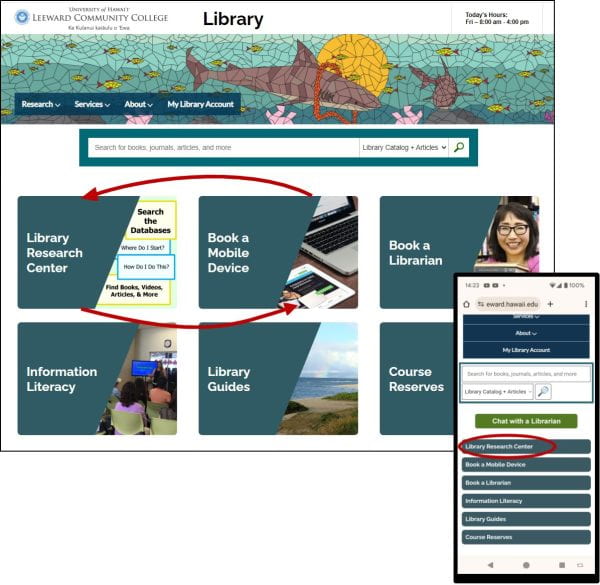
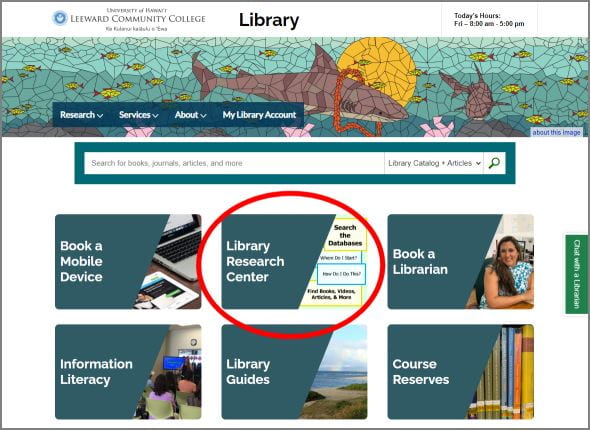
We switched the position of the Book a Mobile Device and Library Research Center buttons on the library's home page. We hope that putting the Library Research Center button in the top left position will make it easier for new visitors to our website to find that page, where we give a guided presentation of our various types of information resources and the tools to find useful information from them. 

Desktop and smartphone views of the home page
The change also effects the placement of the button on the mobile view of the library home page.

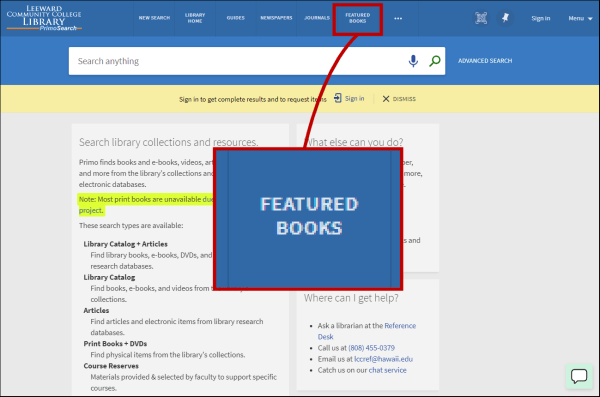
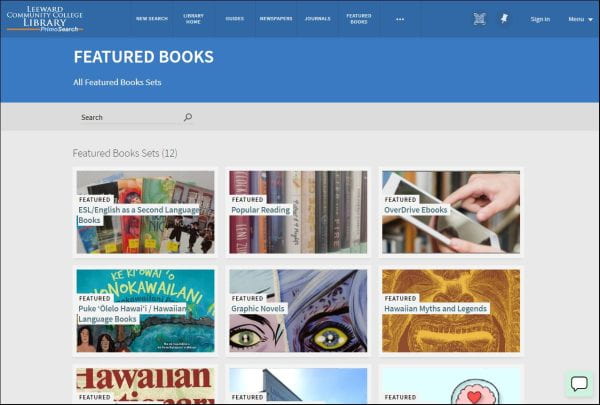
We also re-labeled the Primo search system's "Collections" feature to "Featured Books". Primo serves as the library's online catalog, and also searches across many of our research databases. Primo's Featured Books function allows us to create curated lists of items grouped by special topics or categories, such as graded readers for ESL students, books in the Hawaiian language, selections from our Best Sellers collection, new books, and e-books and audiobooks on the OverDrive platform.

On most desktop views, the Featured Books button is on the menu bar along the top of the screen. On smaller screens, you might need to click on the three-dot button to view more options.

Primo interface, highlighting the Featured Books button in the menu bar.

Primo Featured Books screen.

We renamed this feature to avoid confusion with our other use of the word "collections" to refer to how we group our books into the General Collection, Reference Collection, Hawaiʻi-Pacific Collection, ESL Collection, and others.

The Featured Books lists might not include every item in a given category, depending on what processes can or can't be automated for those particular items.

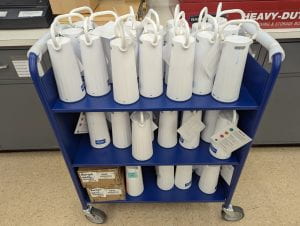
Our Steelcase Flex Mobile Power Units have been recalled by the manufacturer, due to a safety concern. They might not shut off when the battery gets hotter than it should. We are expecting to receive replacement units.

Many white cylinder-shaped battery units sitting on a cart in a staff workroom.

The Flex units can (normally) be used within the Library and Learning Commons to power your laptop or mobile devices, through USB-A or USB-C ports on the unit.

Over the winter break, we made an adjustment to our library homepage to more prominently feature our Library Research Center page. It’s designed to present our research and information resources in a way that accommodates people with different levels of search experience and familiarity with our resources. Key features include:

  • Quick links to our most popular databases at the top
  • Simple searching & advanced searching with the Primo multi-database search system
  • Guidance for novice searchers
  • Links to in-depth information about our resources, and strategies for specific information needs

To make Library Research Center easier to find, we made it one of the six prominent links on the library homepage. This new link replaces the “Research Databases” link to our A-Z Databases page.

homepage with the new link circled

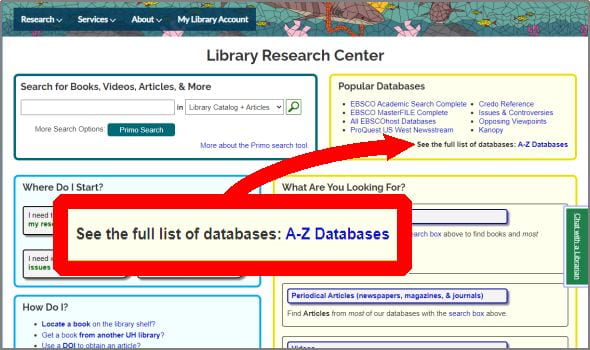
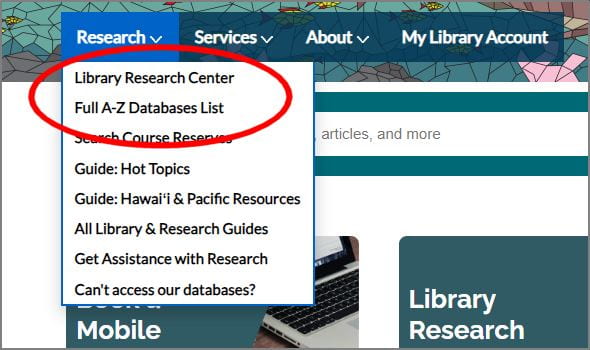
A-Z Databases lists the 100+ databases and online publications we have access to. It has filters and a search function to help find useful databases. We did find that some students misunderstood the nature of the page, assuming it to be a topical search tool rather than a database-finding tool. This sometimes led to erroneous conclusions about the availability of materials on their research topic. Hopefully the more descriptive labels for our other links to A-Z Databases, which can be found in places including the Library Research Center page and in the “Research” menu that appears at the top of almost every library web page, will help reduce confusion.

Library Research Center page with the See the full list of databases: A-Z Databases link highlighted
The Library Research Center and A-Z Databases pages are easily reachable from the menu.
Website research submenu with first two links circled.

The library's website has a new, more intuitive address: library.leeward.hawaii.edu. Easier to communicate and easier to remember, this new address aims to make it easier for students to find our vast array of research databases, physical and online collections, instructional materials, and services.

The new address is also the new domain name for our LibGuides site, which hosts our collection of librarian-created research and course guides, and other information about library services and events. To ensure uninterrupted access to any LibGuides page that you have previously linked to in your bookmarks, course assignments, and Laulima sites, we ask that you update any link using the old domain name "guides.leeward.hawaii.edu" to the current name "library.leeward.hawaii.edu". Simply replace the word "guides" with "library"; the rest of the URL will remain unchanged. Links with the old domain name will stop working in the coming months.

Your cooperation is greatly appreciated as we work to improve access to our online resources.

1

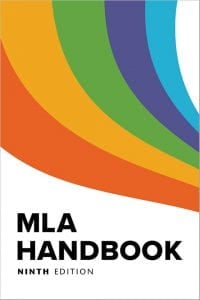
As mentioned in the recent post about MLA Handbook Plus, the Modern Language Association's citation style is largely the same in the recently published 9th edition of the MLA Handbook as it was in the 8th edition. These are some of the differences.

  • The Contributors element, formerly called Other Contributors, has been expanded to include key contributors like film directors, music conductors, and if citing a live performance, groups like dance companies and choirs. (5.38-5.47)

  • URLs that run three full lines or longer should be truncated. (5.96)

  • A Digital Object Identifier (DOI) should be presented as a URL starting with "https://doi.org/". This is also how the APA citation style now presents DOIs in the current 7th edition of their publication manual. (5.93)

    • MLA 8th:   doi:10.1632/ORIW5168
    • MLA 9th:   https://doi.org/10.1632/ORIW5168
  • With MLA 8th, the words University and Press in the names of academic presses should be abbreviated as U and P, e.g., U of Hawaiʻi P. With MLA 9th, if the publisher's name does not include the word University, Press should be spelled out. (5.65)

    • MLA 8th:   Belknap P
    • MLA 9th:   Belknap Press
  • When presenting variant forms of an author’s name, (e.g., an author’s real name for a work published under a pseudonym), use square brackets instead of parentheses. The expanded guidance in the 9th ed. gives you some latitude in presenting the information in a way that you feel is most helpful to the reader. (5.14)

    • MLA 8th:Bachman, Richard (Stephen King)
    • MLA 9th:Bachman, Richard [Stephen King]
      Stephen King [published as Richard Bachman]
  • When citing a social media post, MLA 8th had you use the author’s online handle as the author name, with the author’s real name in parentheses. MLA 9th calls for using the real name, followed by the online handle in square brackets. The online handle can be omitted if it’s similar to the real name and a URL to the post is given. (5.16)

    • MLA 8th:   @GrammarGirl (Mignon Fogarty)
    • MLA 9th:   Fogarty, Mignon [@GrammarGirl]
  • When a publication date includes a season, the season is not capitalized. The rationale is to bring this guidance in line with the practice of not capitalizing seasons in prose. (5.79)

    • MLA 8th:   Spring 2022
    • MLA 9th:   spring 2022
  • “Optional Elements” are now called “Supplemental Elements”, because there are cases in which these elements are required to supply necessary clarifying information. This could be information like a date of access for a source that has been altered or removed. Or an indication of the medium of publication might be needed if multiple forms of a work are available from the same place, such as a web page with both an audio clip and a transcript of that audio. (5.105-5.119)

Sources: MLA Handbook, 8th and 9th eds., Publication Manual of the American Psychological Association, 7th ed.

The library now subscribes to MLA Handbook Plus, an online platform which gives access to the 9th edition of the MLA Handbook, the guide to academic writing from the Modern Language Association. Students now have unlimited access to comprehensive guidance for using the MLA citation style. Also in MLA Handbook Plus are two additional e-books: Guide to Digital Literacy and MLA Guide to Undergraduate Research in Literature.

MLA Handbook Plus also has a "Courses" section, which currently features MLA Style 101, a series of short video lessons about the core elements of the MLA citation template. Each lesson shows how to find the information for that element, and how to put that information into a citation.

While the MLA citation style has changed little since the 8th edition of the handbook, the guidance for citing sources has been expanded and reorganized in the 9th edition. Hundreds of sample citations have been added, as have many illustrations. Among the changes to the citation style are an expansion of the contributor element, options for the handling of long URLs, and changes to how social media content is cited. There are also changes to how pseudonyms, Digital Object Identifiers, certain publishers, and publication dates with seasons are shown.

The 9th edition of the handbook has significantly more content than the 8th edition, including bringing back past handbook content not included in the 8th edition. There is new or updated guidance on quotations and paraphrasing, avoiding plagiarism, formatting papers, footnotes and endnotes, and annotated bibliographies. It also has new writing advice, including guidance for spelling, punctuation, abbreviation, grammar, capitalization, and inclusive language.


Sources: EasyBib's MLA 8 vs. MLA 9: Updates and Highlights and MLA's How Does the Ninth Edition of the MLA Handbook Compare with the Eighth Edition? and the What’s New in the Ninth Edition of the MLA Handbook webinar.

The Primo system, which serves as our library catalog, and also lets you search across most of our research databases and e-collections together, will be unavailable over the Memorial Day weekend, from 3:00 pm on Saturday May 29 until 3:00 pm on Sunday. The system servers are being moved to a different data center.

During this time, you will not be able to check to see which books and DVDs are in the library's collection, or check your library account. You will be able to use our individual research databases (such as Academic Search Complete, MasterFILE Complete, and Credo Reference). However, the "Find It" feature available in some databases, which allows you to search in one database and retrieve articles from a different database or repository, will not work. Similarly, Google Scholar (through our website) will only be able to provide open-access articles, and none of the licensed content available from our databases. For a complete list of our databases and online collections, see the A-Z Databases list.

(Update, May 30) We have lost off-campus access to our research databases. We were told that this would not happen. We anticipate regaining access after the Alma/Primo system is available, scheduled for 3:00 pm.  We apologize for any inconvenience.

The terms of the library's subscriptions to our research databases and online publications require us to limit off-campus access to only current students, staff and faculty. To provide off-campus access to these resources, we use a system called a proxy server, located in Hamilton Library at UH-Mānoa. This system is (mostly) automatically updated from UH student and employee information systems, and it allows our patrons to log in using the same UH username and password used for other university online services.

Occasionally, someone will experience difficulty connecting to a database or online resource. There are various causes for these difficulties. But several are more common than others.

Problem: You Enter Your UH Username & Password, but You Can’t Access the Online Resource

Who is affected: Students enrolled in a course with a non-standard term sometimes end up with their library records not updated as they should be. We also find that students taking classes on multiple campuses might have a problem with their records. This can also happen with late registration, although this usually gets fixed automatically within a few days. Symptoms: When these students try to log in to a database, they might get an error message that says "No UH ID Number found". Or they might first see a message that says "UH Login Successful", but then see a "Sorry, this resource is restricted to..." message. Solution: The Leeward CC Library's Circulation Department at 455-0210 or lcccirc@hawaii.edu can address these problems.

Problem: You Can't Enter Your UH Username

Who is affected: Students located outside of Hawaiʻi, and also users of some mobile hotspots. Due to ongoing network security threats, the firewall at Hamilton Library blocks connections from outside of Hawaiʻi unless a specific exception is made. Symptoms: When an affected person clicks on a database link, the login screen does not load. An "lccproxy.lib.hawaii.edu" address will be in the browser's address bar. After a while, a message may appear that says something like "the site can't be reached" or "the site did not respond".  Another symptom is that the website http://assist.hawaii.edu (which is behind the same firewall) will be similarly unreachable. Solution: Find the IP address of the affected computer by visiting http://myipaddress.com from that computer, and contact the Systems Office at Hamilton Library at 956-7853 or assist@hawaii.edu for assistance. Be advised that due to reduced staff presence in the office, they might not be able create the firewall exception on the same day you report it.

Another option is to use a VPN connection to Mānoa campus. This might be useful if:

  • You cannot wait for the firewall exception to be created
  • The firewall exception doesn't work
  • You are traveling, or moving between different networks

Setting up VPN is a little tedious, but once installed, it's easy to use. Other Hawaiʻi-based VPN servers should also work, as long as it makes your connection appear to originate in Hawaiʻi.

For more information about database access problems, see our troubleshooting guide.

For information about creating links to online articles, e-books, and videos that work on or off campus, see our Linking to Articles in Databases guide.


Skip to toolbar